Actions are managed from Action Settings page accessible from the List Settings page. You must have permissions to edit list settings. In the Office 365 app version, click on the Infowise app in Site Contents, select your list and then click on Actions.
Action Columns
NOTE: Office 365 app version does not have a concept of action column, this section does not apply to apps. On-premises, actions columns are deprecated and are hidden, unless more than one action column was created in previous versions. Action columns will be removed completely in future versions.
Actions must be assigned to one or more action columns. You must create at least one action column before you can create actions. The action columns provide the user interface for action display/management to the end users and store the execution history of the actions for each list item or document.
Optionally provide column owner e-mail address. Every time one of the actions results in an error, an e-mail will be sent to this address.
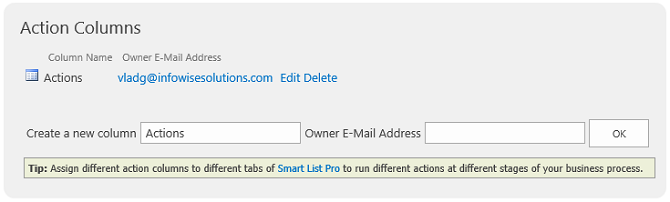
Once you create your first action column, you can start creating actions. The following settings are common to all actions:
Actions List
The list presents existing actions and some information about them. It allows to control the order of the actions, edit them, delete, export or import.
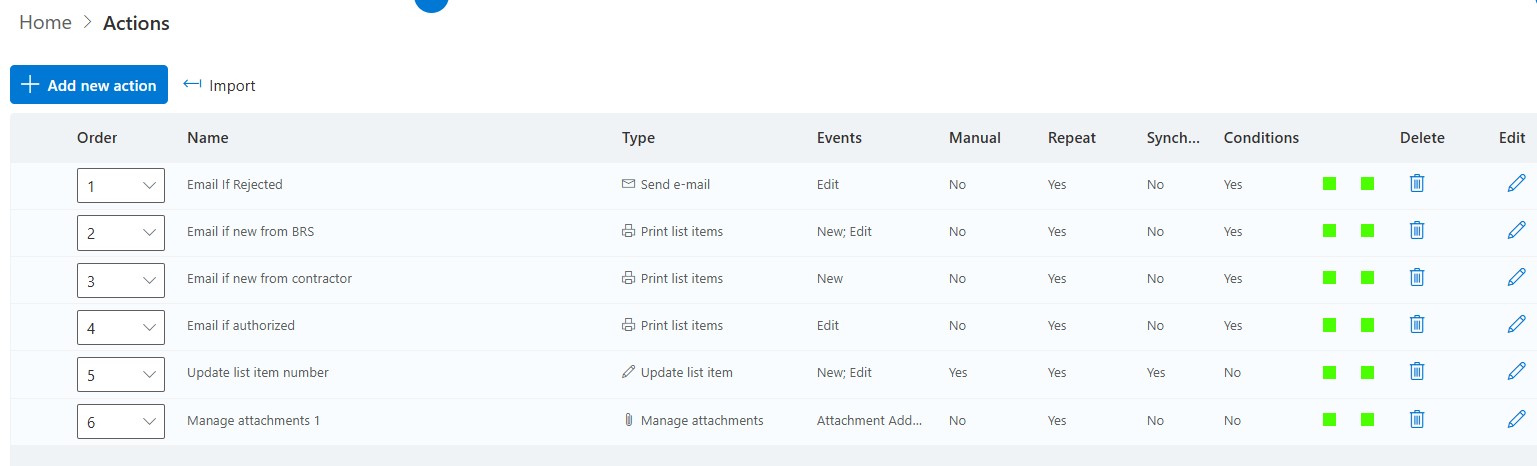
Notice there are 2 color indicator columns on this interface. They are monitor indicators and show a running trend over the last 7 days. The first indicator is about the number of times an action is executed the second indicator shows the duration of the actions.
The green color means that the action falls with thresholds for the last 7 days. A red indicator means that this action has exceeded the thresholds in the last 7 days.
They do not determine if an aciton woudl stop runniing but are for monitoring purposes.
If you hover your mouse (cursor) over the color indcators they will show the value of the last execution.
Add your comment



