Images in SharePoint can process themselves. The Edit Images action in Ultimate Forms performs thirteen image operations automatically, resize, crop, rotate, watermark, logo embedding, background replacement, and more, on list item attachments and library images, triggered by events, schedules, or buttons, with the result replacing the original, saved beside it, or filed to another library. The walkthrough below builds the demo that shows the idea at full strength: a photo whose address, read from the item's Location column, stamps itself into the image's corner the moment the location is set. For the engine this action belongs to, see the automation hub.
The editing nobody should be doing by hand
Image chores are the quiet time sink of visual processes. Field photos arrive at phone resolution and someone resizes them. Product shots need the logo and someone opens an editor. Inspection evidence should carry the site and date and someone types them in a paint program, or more often, nobody does, and the compliance value of the photo quietly evaporates. Each operation is a minute; the real costs are the inconsistency, the fifty photos that arrived while nobody was resizing, and the specialist software on one person's machine that the whole process secretly depends on.
The Edit Images action moves the chores into configuration. The operations cover the practical catalog: resize to dynamic dimensions with optional aspect-ratio preservation, crop by dynamic position and size, rotate by any angle, flip, straighten (automatic, by detecting vertical lines), adjust brightness, contrast, and gamma, grayscale, sharpen, smoothen, blur, change background color with automatic background detection, watermark with dynamically built text, and add logo by embedding an image into the image. "Dynamic" is the operative word throughout: dimensions, angles, and watermark text can come from the item's own column values, which is what turns an image filter into process automation.
Three output choices complete the picture: replace the original (the prior version survives in the file's version history), save beside it with a new name, usually a suffix, or upload to another library, including a dynamically determined site and list. And the output format is a choice of its own, with all major image formats supported, plus HTML, PDF, AutoCAD, and others, so the action doubles as a format converter.
The demo: photos that caption themselves
The scenario uses an image library whose items carry a Location column. A user uploads a photo and sets the location on the map:
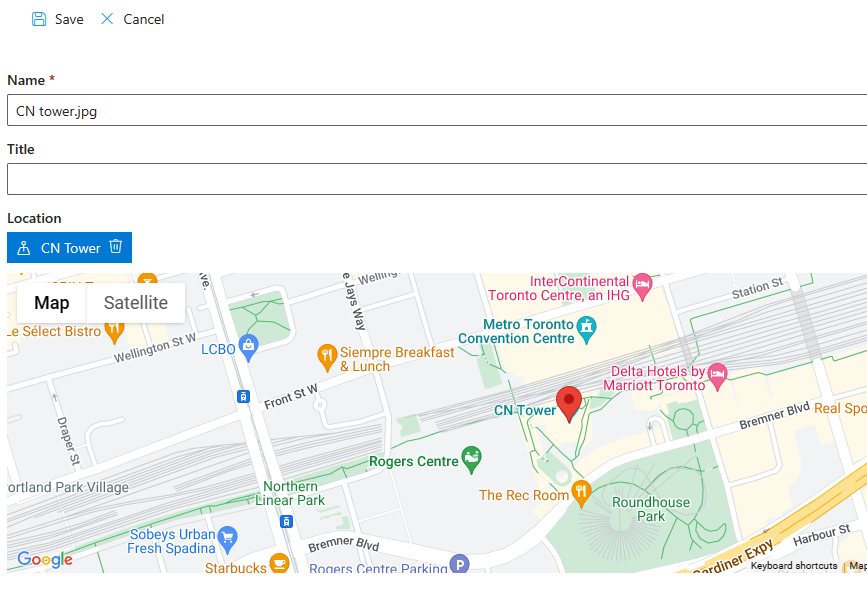
The moment the location is set, the action builds the full address from it and embeds it in the image's top left corner, replacing the original:
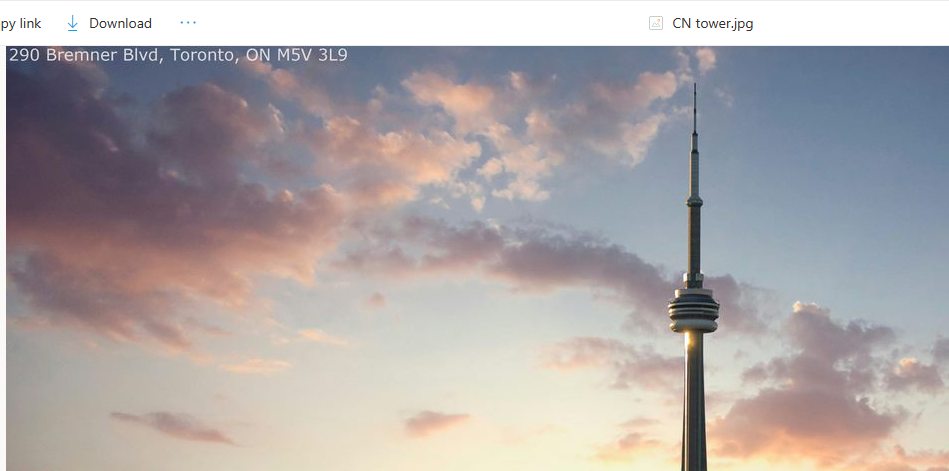
The photo now carries its own provenance, readable in every view, every print-out, and every export, with no editor opened and no one asked to remember.
The build
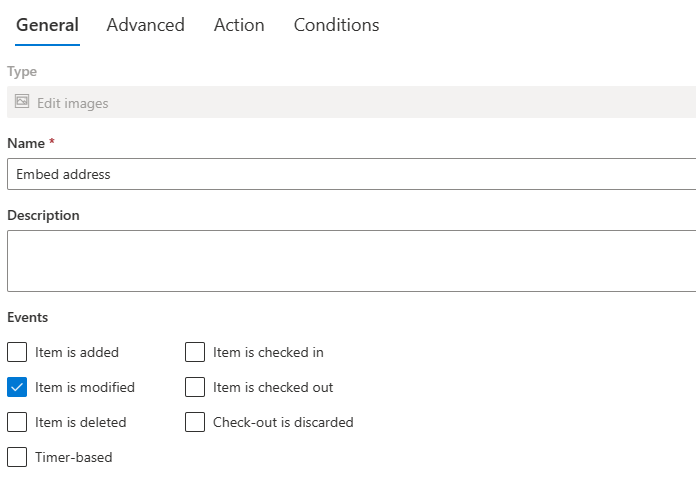
Create a new Edit Images action on the library, with the event set to Item is modified, the trigger moment is the properties being set, not the upload itself:
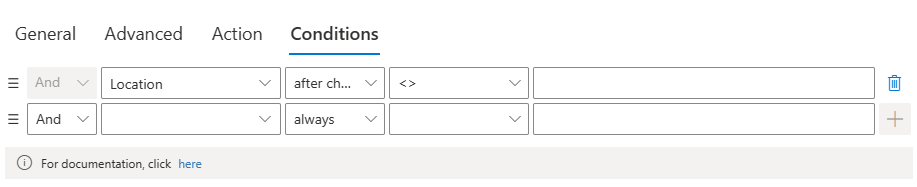
Under Conditions, add an after-change condition on the Location column: not empty, after change. This is the detail that makes the automation polite, the action runs exactly once, when the location transitions from empty to a value, and never again on unrelated edits to the same item:
Then the Action settings, where the operation takes shape:
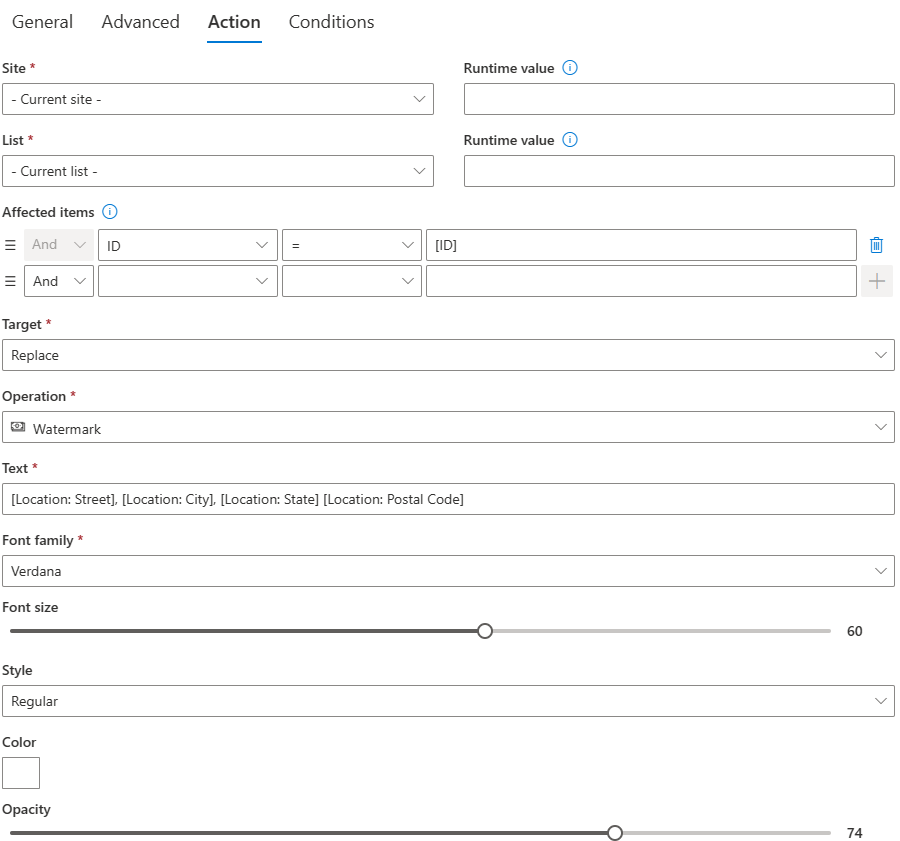
The parts worth reading closely: Affected items says ID=[ID], targeting the item that triggered the action, the usual default, changeable to any items in any site when the operation is broader. Target is set to Replace, with version history keeping the original recoverable. The Text of the watermark is assembled from the Location column's sub-properties in the Value Builder, which is the dynamic-content principle in action: the watermark is not a fixed caption but this item's address. Font and position settings finish the look, and the output format stays as the original.
Save, and the action is live: upload an image, set its location, and within about a minute the stamped version takes the original's place, with the run recorded in Action History like any other.
Choosing the output target
The three output choices encode three different relationships with the original, and picking deliberately avoids later regret. Replace suits corrections and enrichments, the straightened scan, the stamped evidence photo, where the processed version is simply the better version of the same document, and version history keeps the undo available. Save beside suits derivatives: the thumbnail next to the full image, the watermarked copy next to the clean master, where both files have ongoing jobs and the naming suffix tells them apart. Upload elsewhere suits pipelines, raw in one library, finished in another, where the separation is the governance: who may touch raw assets and who consumes published ones are different audiences with different permissions. A process that cannot say which of the three it wants usually has not yet decided which image is the real one, and deciding that first makes every other setting obvious.
The patterns this unlocks
The evidence stamper. Inspection photos, incident documentation, delivery proof: watermark each image with the item's reference number, date, and site, drawn from its columns. The photo becomes self-documenting, which is precisely what audit and dispute scenarios need from it, and the pattern pairs naturally with field photo intake from mobile forms.
The brand pipeline. Product and marketing images uploaded to a staging library get the logo embedded, the dimensions standardized, and the result filed to the published library, three operations, one trigger, and the published library only ever contains finished assets. External submissions can feed the same pipeline, so partner-supplied images arrive raw and publish branded.
The storage diet. Phone cameras produce files an order of magnitude larger than any process needs. A resize action on upload, proportions preserved, brings every incoming photo to a sane size, which compounds across years of accumulating libraries, and a beside-the-original variant keeps a thumbnail for views and dashboards while the full image stays archived.
The normalizer. Straighten, adjust, and grayscale turn an inconsistent stream of user-submitted photos into a visually uniform set, scanned documents that line up, ID photos with consistent exposure, catalog images on a clean background via background replacement.
As ever, the action composes with its neighbors: wrapped in an action group when the image step is one part of an intake operation, chained with Manage Attachments so attachments promote to a library and then process, scheduled for batch sweeps over backlogs, and logged in Action History like every run. The craft is the same one running through the whole actions family: name the chore, express it as an operation on the item's own values, and let the trigger catch the moment it should happen. Images were simply the last content type still waiting for that treatment, and with this action type they stop being special.
Frequently asked questions
Add your comment